---
title: Building a Cryptocurrency Portfolio Tracker Using React and CoinAPI
description: Learn how to build a cryptocurrency portfolio tracker using React and the CoinAPI Exchange Rates API.
order: 12
---
# Building a Cryptocurrency Portfolio Tracker Using React and CoinAPI
## Getting Started with CoinAPI
Before diving into the tutorial, ensure you have:
- Created a CoinAPI account and obtained an API key
- Basic familiarity with React and web development
First things first, to make use of CoinAPI, you'll need to create an account and procure an API key. The key is needed to authenticate your application requests. Follow the instructions provided in CoinAPI's Getting Started Guide to set up your account.
## Setting Up Your React App
Begin by creating a new React application. You can do this using the create-react-app command or your preferred method.
`npx create-react-app coinapi-portfolio-tracker-app`
You should have the following project structure:
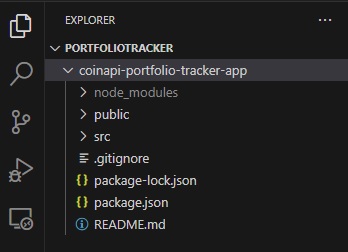
Get into the root of the folder in which package.json resides and check whether the project is compiling & starting:
`npm start`
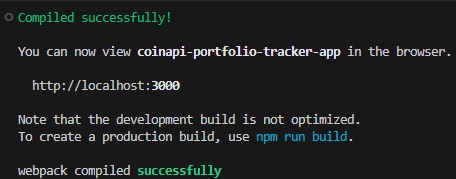
Once your app structure is ready and the project successfully compiles, open the `App.js` file.
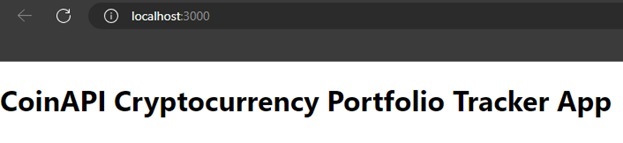
Copy and paste the following code into the `App.js` to see the header displaying "CoinAPI Cryptocurrency Portfolio Tracker App".
```jsx
import React, { useState } from 'react';
function App() {
return (
CoinAPI Cryptocurrency Portfolio Tracker App
);
}
export default App;
```
Start the application again using `npm start`:
## Retrieving Your Portfolio Data from CoinAPI
CoinAPI provides the `v1/exchangerate/asset_id_base` endpoint for fetching the latest exchange rates of your assets.
To request `BTC/USD`, `ETH/USD`, and `XRP/USD` exchange rates from CoinAPI, we'll use **useEffect** hook and **axios module** to retrieve data.
This hook will fetch the exchange rates when the component mounts and then update the portfolio state.
Add the following code as part of the `App.js`:
```jsx
import React, { useState } from 'react';
function App() {
const [portfolio, setPortfolio] = useState([]);
useEffect(() => {
async function fetchExchangeRates() {
const assets = ['BTC', 'ETH', 'XRP'];
const promises = assets.map(asset =>
axios.get(`https://rest.coinapi.io/v1/exchangerate/${asset}/USD?apikey=YOUR_API_KEY`)
);
const responses = await Promise.all(promises);
const exchangeRates = responses.reduce((acc, response, index) => {
acc[assets[index]] = response.data.rate;
return acc;
}, {});
setPortfolio(exchangeRates);
}
fetchExchangeRates();
}, []);
return (
CoinAPI Cryptocurrency Portfolio Tracker App
);
}
export default App;
```
*Note: Make sure to replace `YOUR_API_KEY` with the API key you have obtained via the CoinAPI website.*
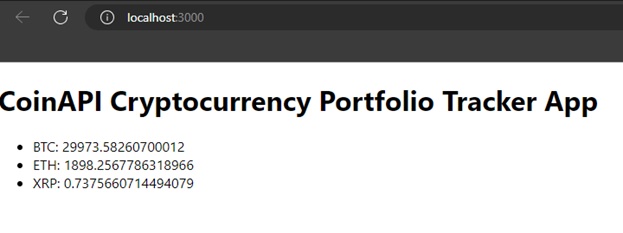
To make exchange rates appear in your web app, update the `return` part with the following code:
```jsx
return (
CoinAPI Cryptocurrency Portfolio Tracker App
{Object.entries(portfolio).map(([asset, exchangeRate]) => (
- {asset}: {exchangeRate}
))}
);
```
Here's the complete `App.js` code:
```jsx
import React, { useState, useEffect } from 'react';
import axios from 'axios';
function App() {
const [portfolio, setPortfolio] = useState([]);
useEffect(() => {
async function fetchExchangeRates() {
const assets = ['BTC', 'ETH', 'XRP'];
const promises = assets.map(asset =>
axios.get(`https://rest.coinapi.io/v1/exchangerate/${asset}/USD?apikey=YOUR_API_KEY`
);
const responses = await Promise.all(promises);
const exchangeRates = responses.reduce((acc, response, index) => {
acc[assets[index]] = response.data.rate;
return acc;
}, {});
setPortfolio(exchangeRates);
}
fetchExchangeRates();
}, []);
return (
CoinAPI Cryptocurrency Portfolio Tracker App
{Object.entries(portfolio).map(([asset, exchangeRate]) => (
- {asset}: {exchangeRate}
))}
);
}
export default App;
```
Before starting the application, make sure to install the **axios** module via the `npm install axios` command.
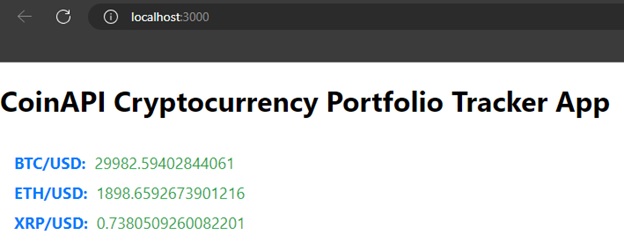
Then start the application with `npm start` and check out the result:
## Styling Your Portfolio Tracker
Having fetched your portfolio data, you can now proceed to style your tracker.
You can use raw CSS or opt for a UI library like Bootstrap or Material UI to enhance the look of your portfolio tracker.
Here we'll use a CSS styling approach and the following classes: `portfolio`, `portfolio-item`, `asset-name` and `asset-rate`.
Extend GUI part with `className` attributes values as following:
```jsx
return (
CoinAPI Cryptocurrency Portfolio Tracker App
{Object.entries(portfolio).map(([asset, exchangeRate]) => (
{asset}/USD:
{exchangeRate}
))}
);
```
then update `index.css` with CSS class implementation:
```css
.portfolio {
padding: 1em;
}
.portfolio-item {
display: flex;
align-items: center;
font-size: 18px;
margin-bottom: 10px;
}
.asset-name {
font-weight: bold;
margin-right: 10px;
color: #007bff;
}
.asset-rate {
color: #28a745;
}
.portfolio-item:hover {
transform: scale(0.95);
transition: transform 0.2s ease-in-out;
}
```
## Retrieve data at regular intervals
Rather than repeatedly refreshing the application to obtain the most recent exchange rates, we can enhance it to fetch this data at specified intervals and automatically update the view.
To update the exchange rates `every 5 seconds`, you can use the `setInterval` function in React.
```javascript
import React, { useState, useEffect } from 'react';
import axios from 'axios';
function App() {
const [portfolio, setPortfolio] = useState([]);
useEffect(() => {
async function fetchExchangeRates() {
const assets = ['BTC', 'ETH', 'XRP'];
const promises = assets.map(asset =>
axios.get(`https://rest.coinapi.io/v1/exchangerate/${asset}/USD?apikey=YOUR_API_KEY`)
);
const responses = await Promise.all(promises);
const exchangeRates = responses.reduce((acc, response, index) => {
acc[assets[index]] = response.data.rate;
return acc;
}, {});
setPortfolio(exchangeRates);
}
fetchExchangeRates();
// Fetch exchange rates every 5 seconds
const intervalId = setInterval(fetchExchangeRates, 5000);
// Clean up the interval when the component unmounts to avoid memory leaks
return () => clearInterval(intervalId);
}, []);
return (
CoinAPI Cryptocurrency Portfolio Tracker App
{Object.entries(portfolio).map(([asset, exchangeRate]) => (
{asset}/USD:
{exchangeRate}
))}
);
}
export default App;
```
By following these steps, you'll create a basic cryptocurrency portfolio tracker using React and CoinAPI.
For more information, you can check [REST API Exchange Rates docs](/products/market-data-api/docs/rest-api/exchange-rates)
If you would like the data to be sent to you in real-time, check our [Real-time data visualization with javascript](/products/exchange-rates-api/docs/how-to-guides/real-time-data-visualization-with-javascript) or [real-time trades stream using WebSocket with different languages](/products/exchange-rates-api/docs/how-to-guides/real-time-trades-stream-using-websocket-with-different-languages) "how-to" articles.
Happy coding!